Restaurant recipe costing software
Know your plate.
Keep up with costs.
Connect reviewed recipes to supplier costs. See what the next invoice changes, which dishes need a closer look and where your menu decisions begin.
14 days, no card required. Single: $59 per location per month. The QR menu stays free.
Inside the recipe workspace
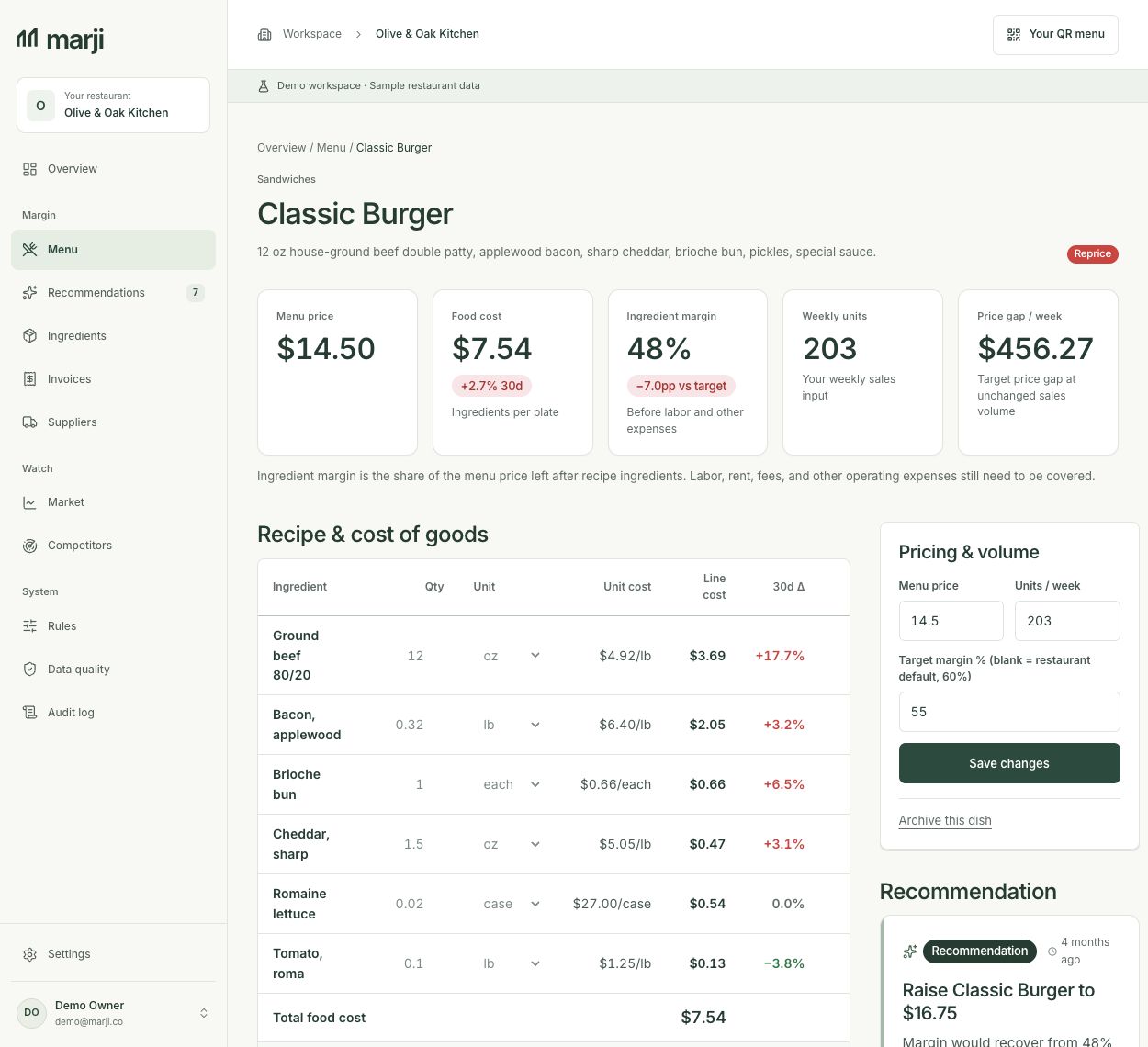
Review quantities, units, yields and purchase costs before using a plate cost. Explore the sample kitchen
One recipe, one invoice, one review
Step 1
Review one recipe
Import dish names and prices from a menu scan or enter them yourself. Check every recipe ingredient against the portion you prepare. Keep raw, trimmed and cooked quantities distinct, and retain unknown costs as unresolved.
Step 2
Match the next invoice
Inspect extracted invoice text, ingredient mapping, pack quantity and price basis. A confidence score is a review aid, not proof of a correct match. Substitutions, unclear units and credits need a separate check before they become current recipe costs.
Step 3
Inspect the affected dishes
Once the ingredient cost is reviewed, check the resulting recipe cost and its source. Compare a supplier, portion or menu-price scenario with explicit assumptions. You decide whether to apply a price change.
Use the invoice review checklist when a supplier changes a pack or substitutes a product. Keep a missing quantity, yield or price unresolved; a partial total is not evidence of a healthy margin.
What the ingredient change does to one dish
Synthetic example: a reviewed ingredient rises from $3 to $4 per pound. The recipe uses 4 usable ounces at 100% yield; the other ingredient lines and selling price remain unchanged. These are sample assumptions, not customer results.
| Input or result | Before | After |
|---|---|---|
| Selling price | $16.00 | $16.00 |
| Changed ingredient: 4 oz at 100% yield | $3/lb → $0.75 | $4/lb → $1.00 |
| Other ingredient lines | $4.25 | $4.25 |
| Complete ingredient cost | $5.00 | $5.25 |
| Ingredient contribution | $11.00 | $10.75 |
| Food cost percentage | 31.25% | 32.8125% |
The added line cost is 4 ÷ 16 × ($4 − $3) = $0.25 per dish. At an assumed 100 dishes per week, that is $25 less ingredient contribution. Labor, packaging, fees, rent and other expenses are excluded. Compare your own numbers in the price-change calculator.
Recipe costing without a POS connection
You can review a recipe, compare purchased ingredient costs and model a price without connecting a register. Weekly contribution scenarios use quantities you enter from your own records. Keep their source and sales period visible; they are not a live sales feed.
Marji does not import POS sales. Square is built but unavailable for a usable connection or write-back, and other listed POS integrations are waitlists. You approve price changes and maintain external registers or ordering channels through your existing process.
A spreadsheet can also maintain shared ingredient prices and linked recipes when it is designed and reviewed consistently. Compare the ongoing invoice-review task using the software-versus-spreadsheet guide. Keep your sheet if it continues to meet that need.
A few useful answers
Check the fit before starting
What does recipe costing software calculate?
It combines ingredient purchase costs, recipe quantities and usable yields into a plate ingredient cost. Selling price then gives ingredient food-cost percentage and contribution before other restaurant expenses. Missing ingredient evidence prevents a verified complete plate cost.
Can a menu photo establish my actual costs?
No. A menu photo supplies dish names and selling prices. AI-drafted recipes are estimates until you check ingredient matches, quantities, units, yields and actual purchase costs. Start with one dish you can review.
Can I use it without a POS connection?
Yes, for reviewed recipe costing and manually entered sales-volume scenarios. Marji does not import POS sales. Square is built but unavailable for a usable connection or write-back; other listed POS integrations are waitlists. Update an external register manually after your price decision.
Does Marji include inventory counts or nested batch recipes?
Marji does not offer stock counting, accounting reconciliation or bill pay. Automatic nested batch and sub-recipe dependencies are not available. Cost a batch separately, retain its finished-yield worksheet and maintain any derived recipe-line amounts yourself.
How much does it cost, and what stays free?
Single is $59 per location per month. Start a 14-day trial without a card. The hosted QR menu and manual menu updates stay free after the trial; new AI scans and margin-engine work require trial or paid access. Operator is invite-only.
Can I continue a free calculator recipe in my account?
Use the calculator’s save-draft control to keep an eligible recipe in this browser for seven days, then sign in or create an account to review it. Confirm actual cost sources and dates, compatible units, yields and complete ingredient lines before importing one new hidden dish. Sample recipes cannot be imported, and a generic allowance must be itemized first. Saving the browser draft alone does not create a dish or publish a menu item.
Get the free recipe costing template, follow purchase-to-portion costing, or review current plan details. Free calculations are available without an account.
Start free trial